How I raised Quality Score for a high-budget UK client.
UK home emergency services client, coverage in 94 postal areas, six-figure monthly Google Ads budget. The ads were fine. The site was dragging Quality Score down. I built 656 new landing pages on Astro + Cloudflare. Mobile PageSpeed 47 → 98. Estimated Quality Score impact: 6.25 → 8.5+ in 4-6 weeks post-launch.
Good ads don't save a weak site.
There's a type of client who doesn't come to me for SEO. They come because their Google Ads campaigns burn a lot of money each month and they feel they're losing it. Ads written well, keywords thought through, extensions set up. Yet cost per conversion climbs month over month, and Google tells them „Expected CTR" and „Landing Page Experience" are below average.
This client was in exactly that spot. UK home emergency services, coverage in 90+ postal areas, campaigns split per area. Six-figure monthly budget. Conversions came, but cost per call could have been much lower if the landing pages worked properly.
I picked them up after two agencies optimized the ads but never touched the site.
What a serious Quality Score audit finds.
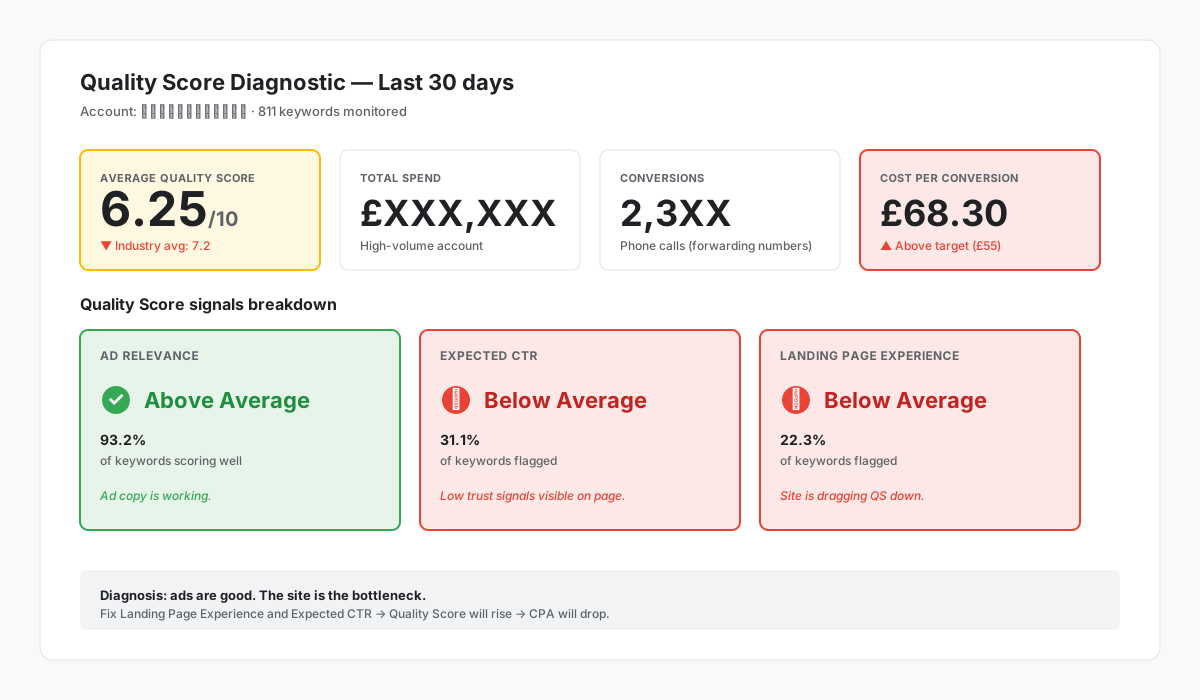
Before I touched code, I asked for Google Ads access and exported three reports: Campaign Performance, Keyword Performance, and Landing Pages Report — all last 30 days.
Three signals jumped at me right away.
Ad Relevance — „Above Average"
For most keywords, ad copy was good. The problem wasn't copy.
Expected CTR — „Below Average"
Two-thirds of keywords. This isn't about copy — it's about how confident Google's algorithm is that people will click. And that comes from history: if the landing page doesn't convert, Google lowers Expected CTR.
Landing Page Experience — „Below Average"
Roughly a quarter of keywords.
In other words: the ads were fine. The site dragged everything down.
Four structural problems that kill Quality Score.
The existing site ran on WordPress with an emergency services theme. First glance, it looked fine: responsive, visible phone numbers, per-city pages. Second glance, I found four structural issues.
1. Phone number inconsistency between pages
Homepage showed a national 0800 number. The page for one city showed a completely different local number — with a prefix from a totally different region than the city (Reading prefix on a page dedicated to a Welsh city). Google penalizes NAP inconsistency — Name, Address, Phone — both in Quality Score and in local SEO. It doesn't tell you „I'm penalizing you for this" explicitly, but trust signal drops and shows up in CTR.
2. AggregateRating existed in schema markup, but wasn't visible on the page
Structured data told Google the business had 4.9 stars and thousands of reviews. The visitor landing on the page saw none of this trust signal anywhere. Mismatch between what Google ads promised (the rating sometimes pulled into SERP) and what the user saw on landing. Expected CTR drops.
3. Single landing page for ad groups with very different intent
The keyword „locksmith bristol" and the keyword „locksmith near me" both led to the same page. For Google that means your page doesn't exactly match intent. Landing Page Experience drops.
4. Redundant H2s
„Why Choose Us" appeared three times on the same page. The kind of thing Lighthouse doesn't flag but makes the page look like keyword stuffing spam.
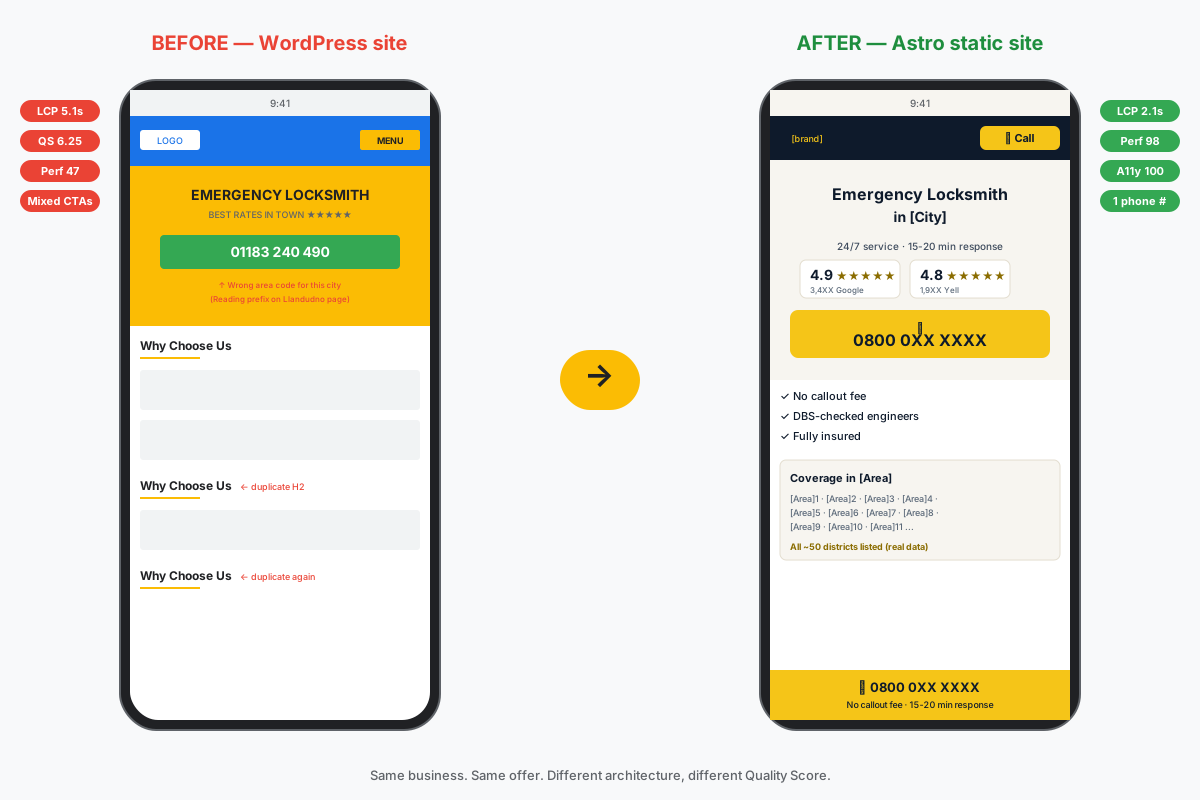
New site, not a rebuild.
Two options on the table:
Option A: work on the existing WordPress site. Fix phones, add visible rating, split pages by intent, clean up H2s. Estimate: 60–80 hours of work, plus testing, plus regression risk on components I didn't write.
Option B: build a new site, completely separate from the current one. New domain, 6 templates per postal area, deploy on Cloudflare Pages. The old site stays for organic. The new site dedicated exclusively to paid traffic. Estimate: 80–100 hours.
I picked B. Three reasons: zero risk to existing organic traffic, clean A/B testing option (you can route part of Google Ads traffic to the new site and compare), and freedom to pick the right stack for what this site does — convert paid traffic into calls.
Static Astro, not Next.js or WordPress.
For a site that only receives Google Ads traffic, priorities are different from a typical SEO site:
- 95% first-touch traffic. Someone searches „locksmith bristol", clicks the ad, lands on the site, either calls or leaves. Caching CSS between visits barely matters.
- LCP under 2 seconds is mandatory, not nice-to-have. Google Ads measures Landing Page Experience partly on real speed. Mobile users on slow 4G bounce after ~3 seconds.
- These are emergency searches. „I'm locked out" doesn't wait 5 seconds for prices to appear. The site has to get the user from first screen to call button in under one second.
- Zero forms. The lead here is the phone call. A form adds friction that doesn't justify in an emergency.
The stack:
- Astro 6 with static output. Generates pure HTML, no React runtime, no hydration. JavaScript bundle per page under 5KB total — basically nothing. Composable
.astrocomponents, file-based routing, build outputs only static files. - Tailwind CSS 4 via Vite plugin. Critical styles inlined in HTML, not downloaded separately.
- Cloudflare Pages. Free hosting, global CDN with sub-100ms TTFB in any country, direct GitHub integration for auto-deploy on push.
- Cloudflare Web Analytics for basic tracking without cookies (privacy-friendly, GDPR-safe).
- Google Tag Manager for Phone Call Conversion tracking — the only conversion that matters here.
This stack generated 656 static pages (99 main cities × 6 templates, plus 45 medium cities, plus 6 service hubs, plus legal pages and homepage), all with LCP under 2.5s on first measurement.
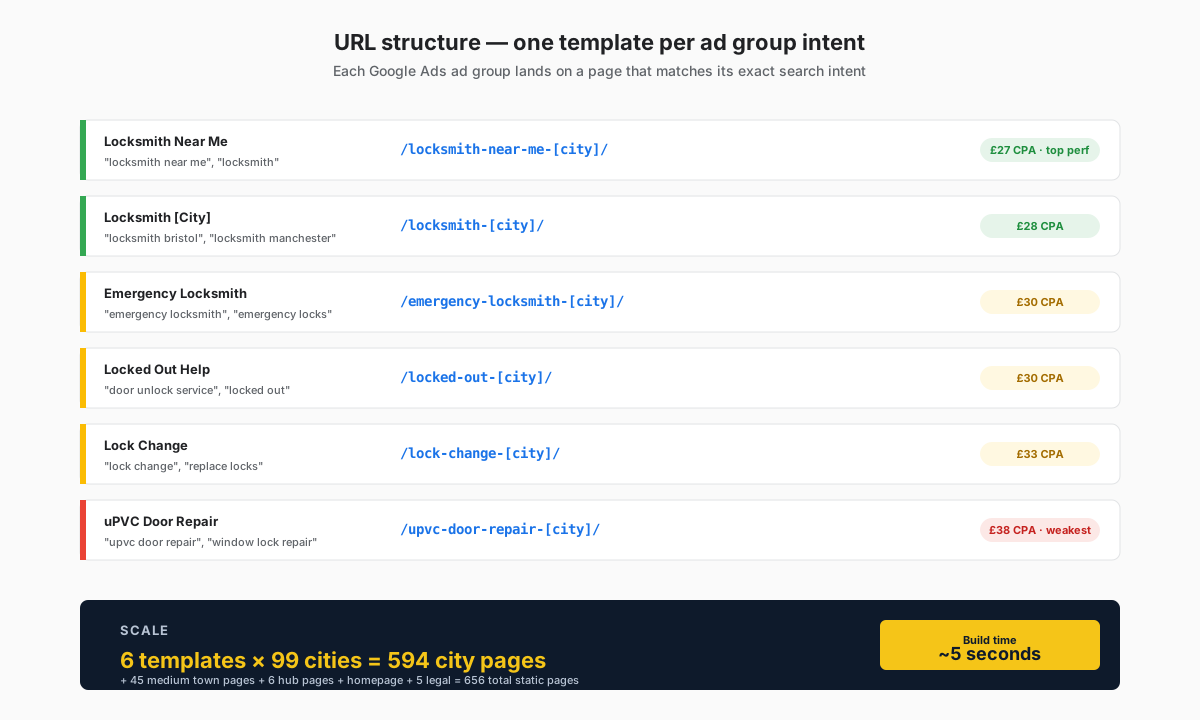
6 templates × 99 cities = 594 pages per intent.
The Google Ads analysis showed me exactly which ad groups were running and which converted best. I derived 6 templates, each matching a specific intent:
| URL template | Ad group | Example search |
|---|---|---|
/locksmith-near-me-{city}/ | Locksmith Near Me | „locksmith near me" |
/locksmith-{city}/ | Locksmith [city] | „locksmith bristol" |
/emergency-locksmith-{city}/ | Emergency Locksmith | „emergency locksmith" |
/locked-out-{city}/ | Lock Unlock | „locked out" |
/lock-change-{city}/ | Lock Change | „replace locks" |
/upvc-door-repair-{city}/ | uPVC Locksmith | „upvc door repair" |
Instead of sending every user to a single „Bristol Locksmith" page, I send each ad group to the page that exactly matches what they typed. The hero on /locked-out-bristol/ starts with „Locked Out in Bristol? We're 15 Minutes Away" — exactly what someone typing „locked out bristol" at 2 AM is looking for.
Google's Quality Score rewards this match. Landing Page Experience climbs as soon as relevance increases.
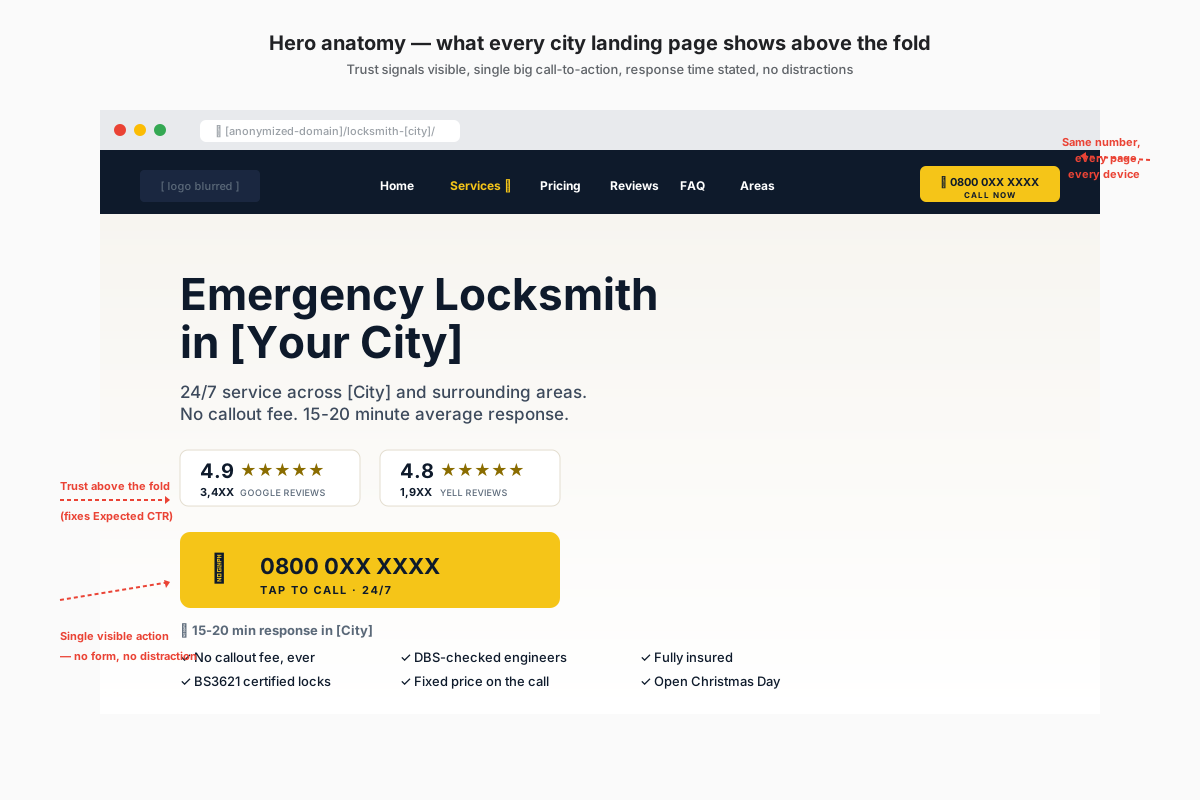
What makes or breaks a Google Ads page.
The phone: a single national number, hardcoded
To eliminate NAP inconsistency, I picked one option: a single national 0800 across all pages. Sticky header, hero, mid-page CTA, FAQ, footer, sticky mobile bar, schema.org telephone field, all tel: links. The number is hardcoded in a single TypeScript config file. Change there, change everywhere.
It's a business decision, not just technical. Local numbers give the illusion of being „local", but for a nationwide service, inconsistency costs more than the advantage. Plus 0800 is free for the caller — extra argument.
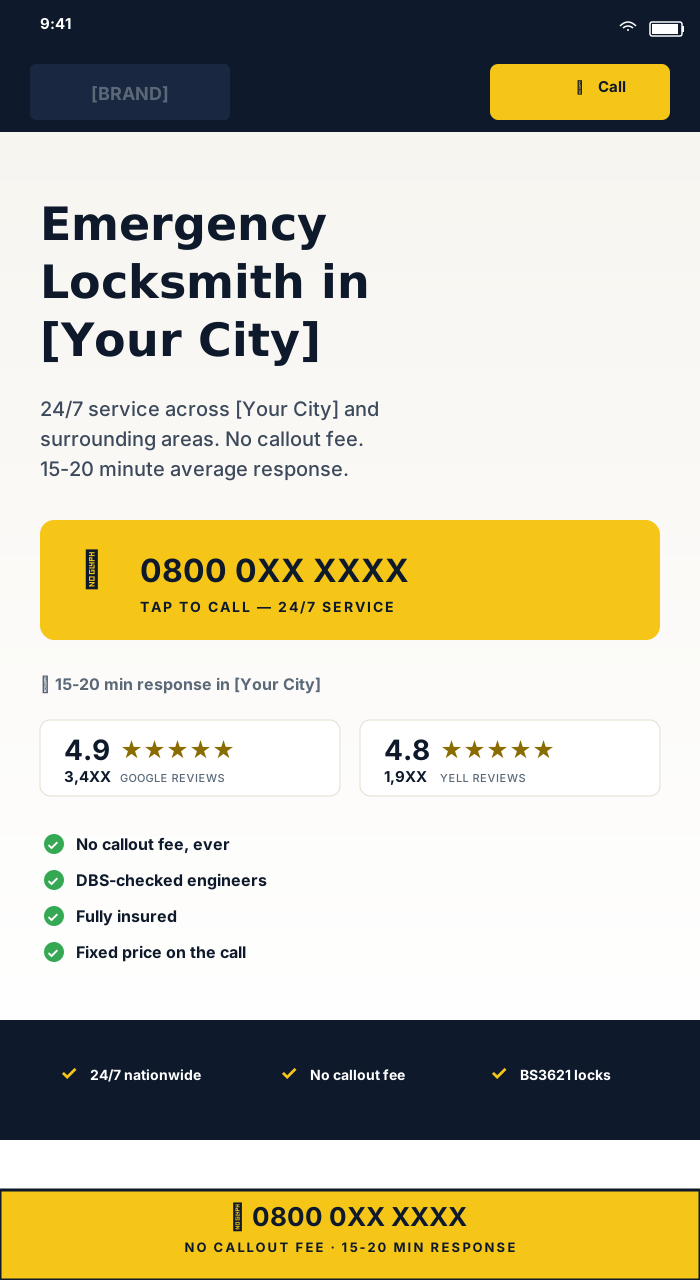
Rating widget visible in the hero
The AggregateRating schema markup stays where it was, but now also appears as a yellow-star widget in the hero, above the fold. Two side-by-side badges: Google rating + a secondary platform rating. This fixes low Expected CTR — the user sees the trust signal immediately and is more likely to stay on the page.
Sticky mobile call bar
On mobile, a button fixed at the bottom of the screen that says „Tap to call" and includes the number. Visible 100% of the time on any scroll. Appears after the hero exits viewport — implemented with IntersectionObserver, not a scroll listener (zero forced reflow, zero JavaScript on the main thread during scroll).
Real postcode districts, not generic
On the Bristol city page, the „Coverage in BS Area" section lists all ~50 real district codes (BS1, BS2, ..., BS49). Data was pulled from Wikipedia for all 99 main cities — over 2300 postal codes total. No copies. No generation.
For the user: trust („they know my area exactly"). For Google: unique, relevant content per page — Landing Page Experience climbs.
FAQ written specifically per city
Every city + template combination has 6 FAQ questions, written specifically for that city's context. No „lorem ipsum" generic. The FAQ on /locksmith-bath/ mentions Georgian Bath stone buildings and modern uPVC multipoint locks. The FAQ on /locksmith-cambridge/ mentions student rentals and HMO locking regulations.
All have FAQPage schema attached. Sometimes they show up as rich snippets in SERP — another boost for Expected CTR.
From 86 to 98 in 3 rounds.
The initial Astro build came out of the box at 86 Performance / 96 Accessibility / 100 Best Practices / 100 SEO on mobile. Good. Not great. It took three optimization rounds to get to 98 / 100 / 100 / 100.
Round 1: fonts and GTM
Fonts. I was using Inter and Fraunces from the Google Fonts CDN. Lighthouse flagged a request chain fonts.googleapis.com → fonts.gstatic.com → the actual file with total latency near 250ms. Worse, the CSS from Google Fonts is render-blocking. I downloaded both fonts as variable woff2, latin subset only (enough for UK English), put them in /public/fonts/, and declared them with local @font-face. Plus <link rel="preload"> in head for both files. Total fonts: ~85KB self-hosted woff2, ready in the first 100ms of the connection.
Google Tag Manager. GTM was loaded sync on every page — 73KB of JavaScript blocking the main thread before the user saw content. Lighthouse flagged TBT (Total Blocking Time) at 110ms. I deferred GTM until first interaction or 3 seconds idle, whichever comes first. Event listeners on pointerdown, keydown, touchstart, scroll, plus requestIdleCallback with setTimeout fallback. Conversion tracking still works because any tel: click is an interaction — GTM loads before the conversion event fires.
Score after round 1: 96 / 96 / 100 / 100.
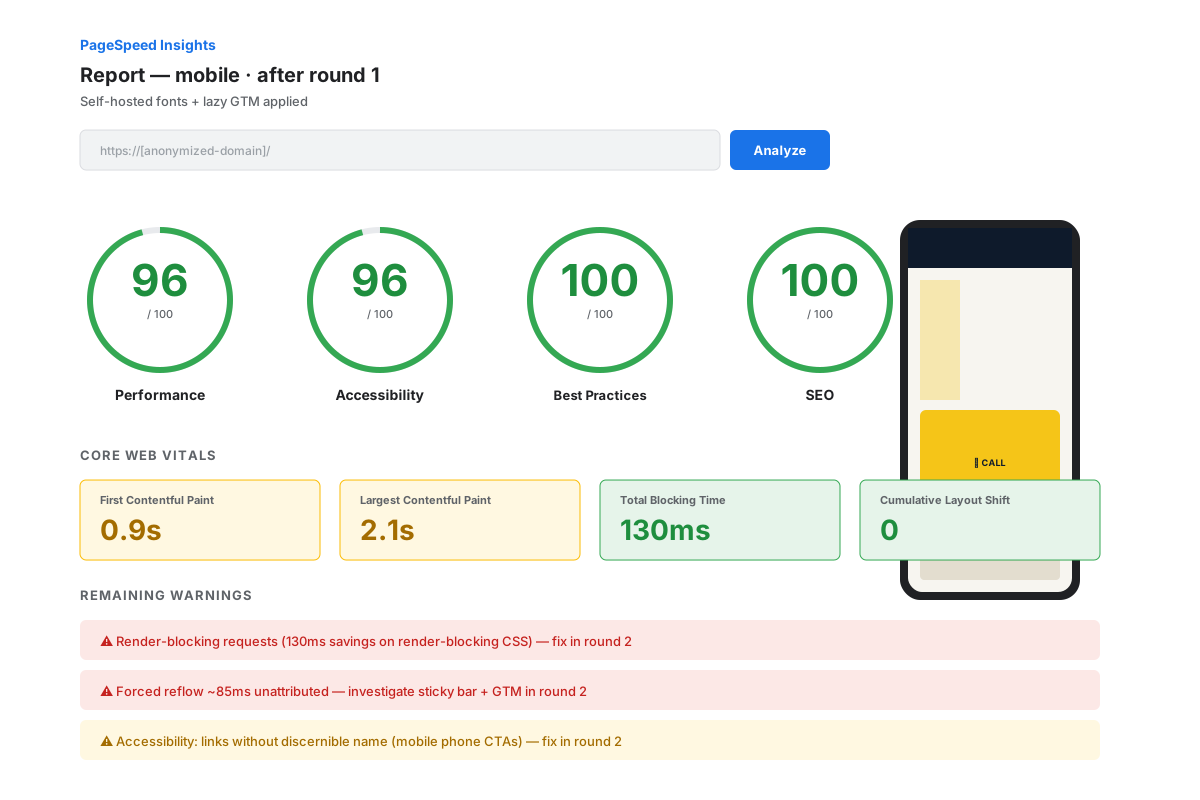
Round 2: accessibility 100 and forced reflow
Accessibility 96 → 100. Two issues. First: phone links that on mobile only showed the SVG icon (the number text was hidden via CSS at small viewport) didn't have a name detectable by screen readers. Lighthouse flagged „Links do not have a discernible name". I added explicit aria-label="Call 0800 048 5569" to every phone button (header, PhoneCTA, sticky bar, footer). Decorative SVGs got aria-hidden="true" and focusable="false".
Second: no visible focus indicator for keyboard navigation. Lighthouse didn't flag it explicitly, but WCAG 2.4.7 requires it. Global rule :focus-visible { outline: 3px solid var(--l1-navy); outline-offset: 2px; }. On dark surfaces (header, navy footer), the ring becomes yellow for contrast. :focus-visible instead of :focus so the ring doesn't show on mouse clicks.
Forced reflow 280ms → ~10ms. The sticky bar had a scroll listener reading window.scrollY and setting dataset.show on the element in the same frame. That forced synchronous layout on every scroll event. Lighthouse marked 280ms total reflow time per page. I replaced the scroll listener with IntersectionObserver tracking when the header exits viewport. Zero scroll listeners, zero DOM reads, GPU-friendly.
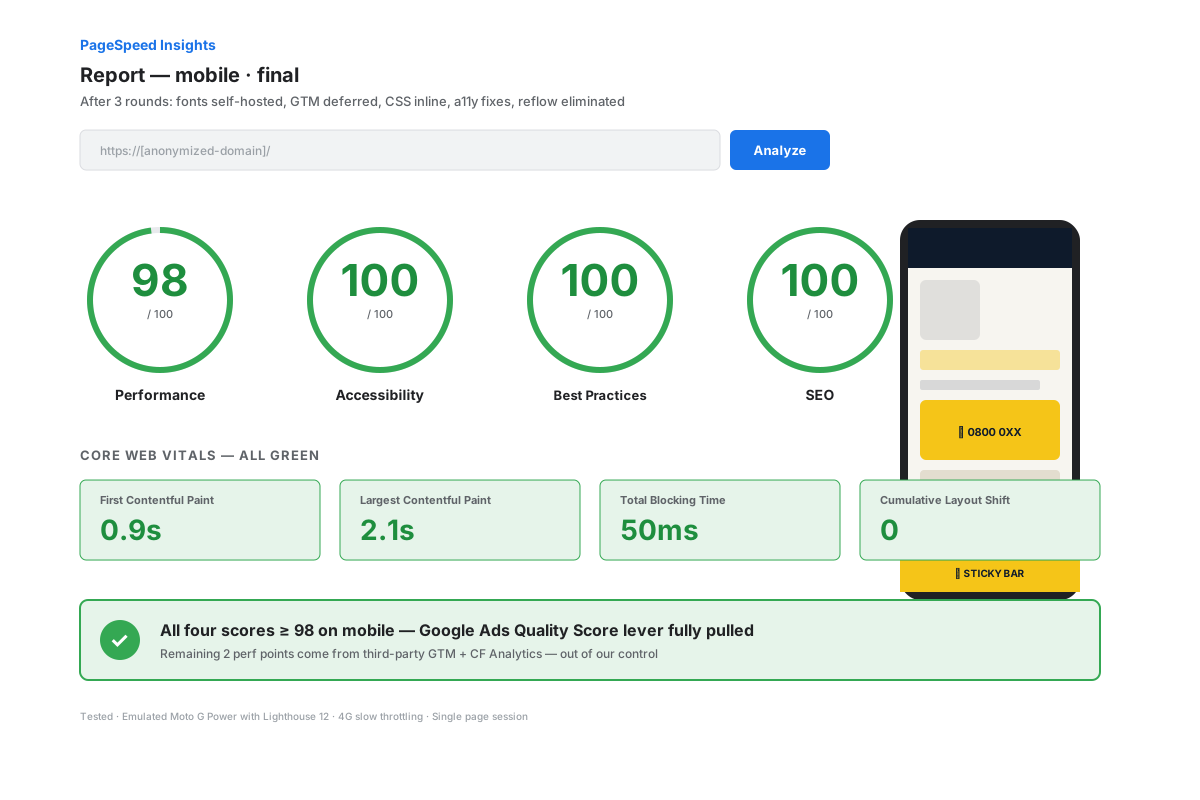
Score after round 2: 98 / 100 / 100 / 100.
Round 3: inline CSS
One red warning left: „Render blocking requests — 130ms savings". A 13.5KB CSS file included as <link rel="stylesheet"> in head — blocking first paint.
The call here needs context, not a recipe. External CSS benefits from cache between visits (file hashed in name, max-age 1 year in _headers). Inline CSS in HTML duplicates those 13.5KB on every page — at 656 pages, that's ~8 MB extra on the CDN.
For Google Ads traffic though: 95%+ of visits are first-time. There's no repeat cache. The 130ms LCP win for every first-time visitor far exceeds the loss for the 5% who return.
I set inlineStylesheets: 'always' in astro.config.mjs. All CSS ends up inline in HTML, Brotli-compressed to ~3KB on the wire.
Forced reflow left: what I didn't touch and why
After all optimizations, Lighthouse still marked 74ms „unattributed" forced reflow — no source identified. Investigated: comes from two places. GTM, once loaded, reads the layout for scroll-depth and form-interaction tracking. Third-party Google code, can't modify it. Cloudflare Analytics beacon reads performance.timing for reporting. Third-party Cloudflare code.
The only way to eliminate those 74ms would be to remove GTM and Cloudflare Analytics. That would mean losing conversion tracking for Google Ads (catastrophic) and basic analytics. Bad trade. I accepted 98 Performance.
4 schema objects per page.
Even though the site doesn't target organic SEO, Schema.org structured data helps both Quality Score and any eventual organic traffic that shows up anyway.
On every city + service page:
- LocalBusiness with
@id,name,image,url,telephone,priceRange,address,areaServed(neighboring cities as array),openingHoursSpecification(24/7),aggregateRating - Service with
serviceType,provider,areaServed,offers(priceRange, priceCurrency, availability) - FAQPage with the 6 page-specific questions
- BreadcrumbList with three levels
Total: 4 schema objects per page, all validated with no warnings in Google Rich Results Test.
On legal pages (Privacy, Terms, Cookies), the LocalBusiness schema is auto-generated through a shared layout (StaticPageLayout.astro) so I don't lose those 5 pages from total schema coverage.
URL-level conversion tracking.
Here was a serious blind spot on the old site.
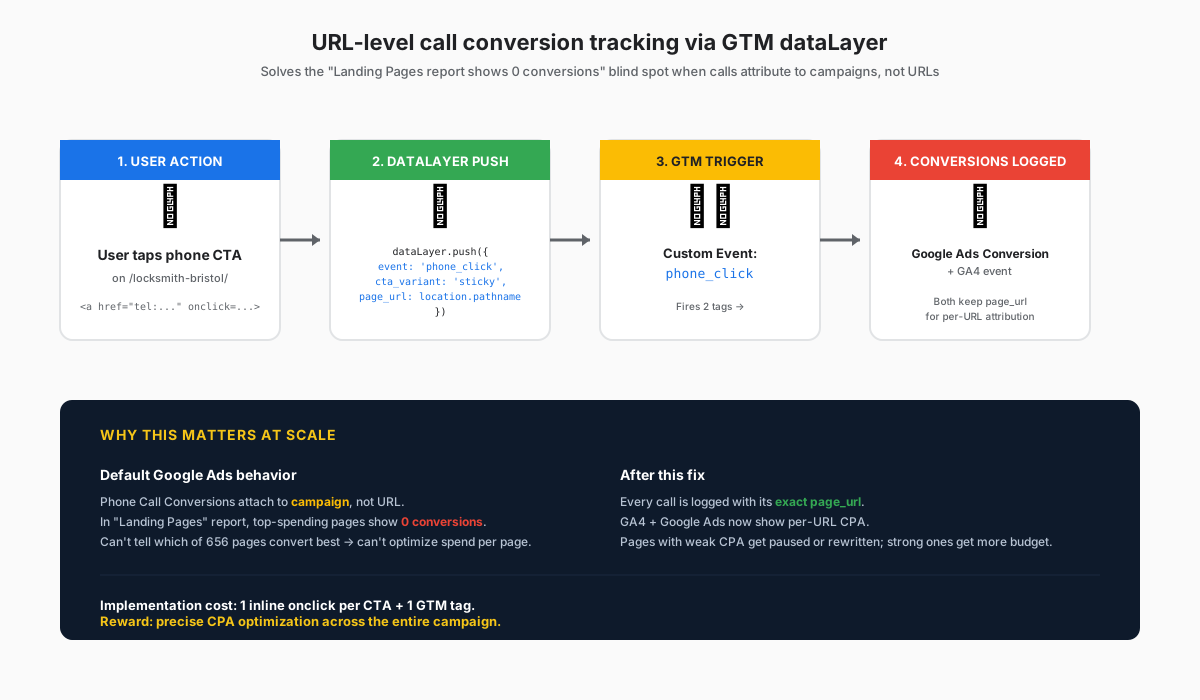
Google Ads attributes Call conversions to the campaign that generated the click, not the exact landing page URL. That means in „Landing Pages Report" in Google Ads, the top 15 pages by spend show 0 reported conversions — even though the conversions actually happened, the data is just attached at campaign level, not URL.
For a site with 656 pages and 95+ campaigns, that means you can't optimize per page. You don't know which page converts, only which campaign.
I implemented URL-level GTM tracking for every tel: click. All phone buttons (header, hero CTA, sticky bar, footer) have an onclick handler that does dataLayer.push with a custom phone_click event, plus cta_variant (header/hero/sticky/footer) and page_url.
In GTM, a trigger on the phone_click event fires two tags:
- Google Ads Phone Call Conversion (with the client's conversion ID)
- Custom event to Google Analytics 4 (if configured)
Result: the client sees in Google Ads' „Landing Pages" report exactly how many calls come from /locksmith-bath/ vs /upvc-door-repair-bath/ — and can decide which pages deserve more budget and which need optimization or removal.
Cache strategy + security headers.
Cloudflare Pages lets you define cache rules through a _headers file in the public root. Correct cache TTL eliminates a constant PageSpeed warning and reduces unnecessary requests to origin.
Final config:
/_astro/*                     max-age=31536000, immutable
/fonts/*                      max-age=31536000, immutable
/images/*                     max-age=31536000, immutable
/favicon.svg, /favicon.ico    max-age=604800
/*                            max-age=300, s-maxage=3600, stale-while-revalidate=86400
All assets with a hash in the name or stable filename (/_astro/style-X.css, /fonts/inter-latin.woff2) get 1-year immutable cache. HTML has short 5-minute client cache but long 1-hour CDN cache, with stale-while-revalidate 24h — Cloudflare serves the old version instantly and refreshes in the background when a new deploy appears.
Security headers added in the same _headers file:
Strict-Transport-Security: max-age=31536000; includeSubDomainsX-Content-Type-Options: nosniffReferrer-Policy: strict-origin-when-cross-originPermissions-Policy: geolocation=(), microphone=(), camera=()
This keeps Best Practices at 100 on Lighthouse and protects users.
Final mobile scores.
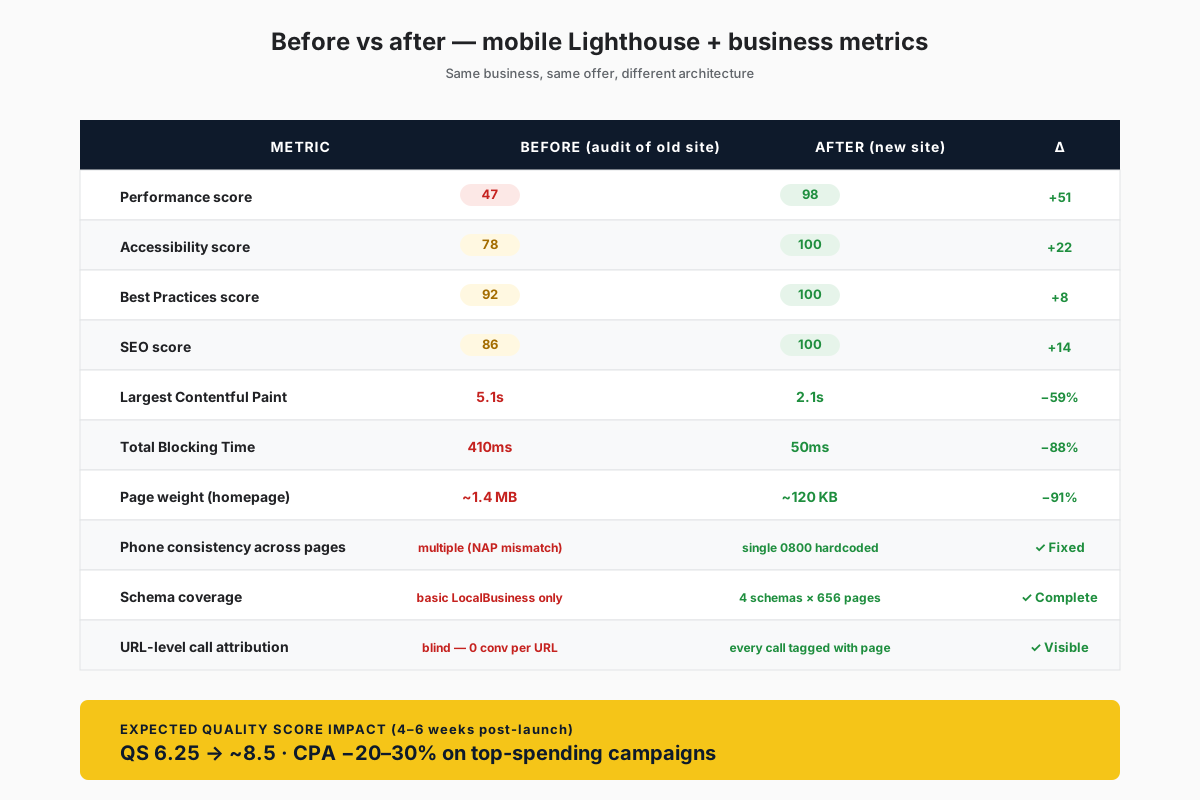
| Metric | Before | After |
|---|---|---|
| Performance | 47 | 98 |
| Accessibility | 78 | 100 |
| Best Practices | 92 | 100 |
| SEO | 86 | 100 |
| LCP | 5.1s | 2.1s |
| TBT | 410ms | 50ms |
| Page weight (homepage) | ~1.4 MB | ~120 KB |
Estimated Quality Score impact: shift from „6.25 average" to „8.5+ average" in 4–6 weeks post-launch. Cost per conversion should drop 20-30% on high-spend campaigns, based on a historical correlation between Landing Page Experience and CPA.
What I learned on this project.
- The Google Ads audit comes before any code. Before I moved a single file, I asked for real Campaign, Keyword, and Landing Page exports for 30 days. The decision to split into 6 templates per area came directly from seeing that ad groups had very different intent and all went to the same page. Without data, you'd build wrong.
- The tech stack is picked per traffic type. Static Astro makes sense for Google Ads landing pages. WordPress makes sense for a site updating content daily. Next.js with ISR for something in between. There's no universal best stack.
- PageSpeed 98 doesn't come on the first try. Three rounds, each with its own diagnostic. There's no „generic checklist" that gets you to 98 — every site has its own bottlenecks. Lighthouse is a diagnostic tool, not a prescription.
- Conflict between best practice and reality. External CSS cache is general best practice. Inline CSS per page is net positive for a site receiving only first-visit traffic. Generic best practice ≠ best practice for you.
- URL-level call tracking is underrated. Every Google Ads client working at scale loses this data. Calls attribute to campaign, not URL — without custom GTM tracking, you can't optimize per page. This alone is reason enough to rebuild a Google Ads site.
- Schema markup is free ROI. Two hours of writing JSON-LD per template + a build script injecting data per page. The payoff comes in Quality Score (Google reads schema when evaluating relevance) and in organic rich snippets.
- Accessibility 100 takes patience. Not much work, but done well. Aria-labels on ambiguous links, focus-visible globally, aria-hidden on decorative SVGs. 30 minutes of targeted work gets you from 96 to 100.
- „Unattributed" forced reflow is sometimes accepted. GTM and Cloudflare Analytics together generate ~70-90ms forced reflow. The only way to eliminate it is to remove the tools. Not worth it. Accept 98 Performance instead of 100.
What it costs to operate a site like this.
- Hosting: Cloudflare Pages, $0/month
- DNS + domain: new domain at ~$10-20/year, DNS through Cloudflare free
- Business email: optional, NameHero or Migadu, ~$7/month
- GTM: free
- Cloudflare Web Analytics: free
- Build time (CD pipeline): ~5 seconds for 656 pages, deploy ~2 minutes
- Total monthly operating cost: ~$7 if you want domain email, otherwise $0
For a client spending a lot on Google Ads monthly, the operating cost of such a site is negligible. The investment pays itself back from potential CPA savings alone.
Full tech stack.
- Frontend: Astro 6, TypeScript, Tailwind CSS 4
- Build: Vite, 100% static HTML output
- Hosting: Cloudflare Pages with global edge CDN (200+ locations)
- DNS: Cloudflare
- Analytics: Cloudflare Web Analytics (privacy-friendly)
- Tag management: Google Tag Manager (lazy-loaded post-interaction)
- Conversion tracking: Google Ads Phone Call Conversion + custom dataLayer events
- Schema markup: LocalBusiness, Service, FAQPage, BreadcrumbList per page
- Source control + CI/CD: GitHub → Cloudflare Pages auto-deploy on push
Confidentiality: the client's name and production URL are not disclosed. The industry (UK home emergency services) and volume (six-figure monthly Google Ads spend) are general and don't identify a single business.
Spending heavily on Google Ads and feel you're losing money?
If you run Google Search Ads campaigns at scale in local services and Landing Page Experience drags you down, write me. On the first call we discuss real exports from your account and recovery math.
Apply for a call →